
Download Less Annoying CRM – Simple, Affordable CRM for Small Businesses
Overview
In the crowded world of customer‑relationship‑management tools, most platforms are built with the needs of large enterprises in mind. Complex pricing tiers, heavyweight feature sets, and steep learning curves can make these solutions feel more like a burden than a help for a team of ten or twenty people. Less Annoying CRM was created to flip that script.
From the very first line of code the developers focused on what a small business truly needs: a clean interface, essential contact and pipeline management, and a price that won’t eat up the entire marketing budget. The product is not free, but it offers a straightforward 30‑day trial that lets you test every function without a credit‑card commitment. After the trial, the service costs just $10 per month, with no hidden fees, long‑term contracts, or usage‑based surcharges.
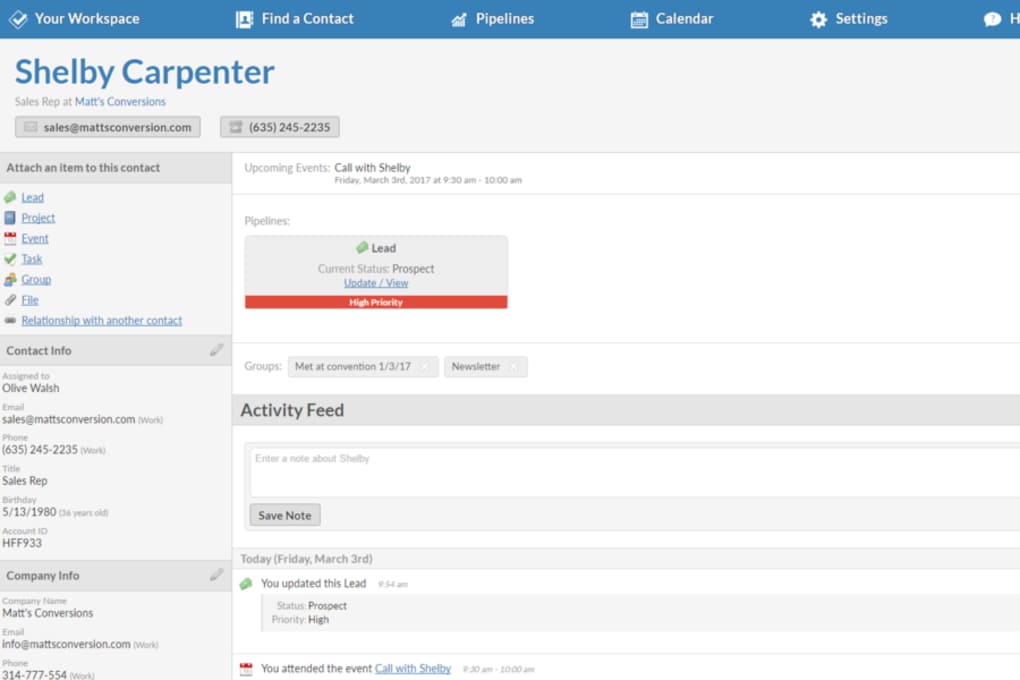
This transparency makes budgeting simple and eliminates the surprise invoices that plague many SaaS products. In practice, Less Annoying CRM provides a single‑page dashboard where you can add contacts, assign them to deals, set reminders, and generate basic reports—all without diving into dozens of configuration screens. The design philosophy is “do one thing well and keep everything else out of the way,” which means you spend less time hunting for settings and more time closing sales.
Whether you’re a freelancer, a boutique agency, or a local retailer, the platform scales to match the modest growth expectations of a small firm while still delivering the reliability of a cloud‑based service.
Key Features Tailored for Small Teams
- Contact Management – Add, edit, and tag contacts with a single click; import from CSV or Outlook.
- Simple Pipeline – Visualize deals in three default stages (Lead, Negotiation, Closed) with the ability to customize stage names.
- Task & Reminder System – Set follow‑up tasks that appear on the dashboard and trigger email reminders.
- Activity Log – Every interaction (email, call, note) is automatically logged for easy reference.
- Basic Reporting – Generate monthly summaries of new leads, closed deals, and revenue without leaving the app.
- Secure Cloud Storage – All data is encrypted in transit and at rest, hosted on reputable data centers.
- Mobile Access – Native iOS and Android apps let you update pipelines on the go, while the web app works on any modern browser.
- Integrations – Connect with Gmail, Outlook, and Zapier to automate contact creation and email tracking.
- Unlimited Users – Add as many team members as you need for the same flat monthly price.
- 30‑Day Free Trial – Full access to every feature, no credit‑card required.
Installation, Usage & Compatibility
Getting started with Less Annoying CRM is intentionally frictionless. Because the product is cloud‑native, there is no traditional “installation” process for desktop users—simply navigate to lessannoyingcrm.com, create an account, and you’re ready to explore the dashboard. For teams that prefer a dedicated app, native clients are available for Windows, macOS, iOS, and Android. The Windows client is a lightweight Electron wrapper that launches in under five seconds, while the macOS version is a signed .dmg file that meets Apple’s Gatekeeper requirements. Mobile apps can be downloaded from the Apple App Store or Google Play Store; both apps mirror the web interface and support push notifications for task reminders.
Once logged in, the first screen greets you with a clean “My Pipeline” view. Adding a new contact is as simple as clicking the “+ Add Contact” button, filling out name, email, phone, and optional tags, then hitting “Save.” The contact automatically appears in the “All Contacts” list and can be dragged into any pipeline stage. To create a deal, select a contact, click “New Deal,” assign a monetary value, set an expected close date, and choose the appropriate stage. All actions are saved in real time, eliminating the need for a manual “Save” button.
Compatible operating systems include Windows 10 or later, macOS 10.13 or later, iOS 13+, Android 8+, and any recent version of Chrome, Firefox, Safari, or Edge. Because the service runs on a secure HTTPS connection, you can also access it from public computers or shared workstations without compromising data integrity.
The onboarding experience includes a short video walkthrough and a library of help articles that cover everything from importing legacy data to setting up email integrations. If you encounter an issue, a built‑in chat widget connects you to the support team, who typically respond within an hour during business days. The combination of zero‑install web access, native apps for on‑the‑go use, and broad OS compatibility makes Less Annoying CRM one of the most accessible tools for small businesses that need a reliable CRM without the IT overhead.
Conclusion, Pros & Cons, and Frequently Asked Questions
Pros
- Simple, uncluttered interface that requires minimal training.
- Flat‑rate $10/month pricing with no hidden fees or contract lock‑ins.
- Full feature access during a 30‑day free trial.
- Robust mobile apps for iOS and Android.
- Secure cloud storage with regular automatic backups.
- Unlimited user accounts included in the base price.
Cons
- Lacks advanced automation and AI‑driven insights found in enterprise‑grade CRMs.
- No built‑in telephony or SMS integration.
- Reporting is limited to basic tables; no custom dashboards.
- Only one pricing tier – larger teams may outgrow the feature set.
Is there a free version of Less Annoying CRM?
No, the service does not offer a permanently free tier, but you can use the full product for 30 days without paying. This trial period gives you unrestricted access to all features, allowing you to evaluate whether the tool fits your workflow before committing to the $10/month subscription.
Can I cancel anytime without penalties?
Yes. The subscription is month‑to‑month, and you can cancel directly from your account settings. There are no early‑termination fees, and your data remains available for export for 30 days after cancellation.
Does Less Annoying CRM integrate with my email provider?
It integrates natively with Gmail and Outlook. You can connect your email account to automatically log inbound and outbound messages, and you can also use Zapier to bridge the CRM with many other services.
Is my data safe and compliant?
All data is encrypted in transit (TLS) and at rest (AES‑256). The hosting environment complies with GDPR and CCPA standards, and the company provides a data‑processing agreement for enterprise customers.
Can I import contacts from another CRM?
Yes. The platform supports CSV import, and there are step‑by‑step guides for migrating from popular tools such as HubSpot, Zoho, and Insightly. During the trial you can test the import process without affecting your live data.
If you’re ready to replace a tangled spreadsheet or an over‑engineered enterprise CRM with a tool that actually respects the size of your business, download Less Annoying CRM today. Start your 30‑day trial, explore the simple pipeline, and see how a $10/month investment can turn chaotic contact lists into a clear, actionable sales engine.



.png)



